Returning supporter? Your existing access is still active. Use Forgot password to sign in. If it doesn't work, submit a ticket and we'll help restore your access.

What's New

Updates, new addons, and changes across the Roxxy Hub.

release Jul 29, 2026

Pimp Bunny joins the Hub

Pimp Bunny is now available as its own standalone addon in the Roxxy Hub. It sits alongside JustPorn and OnlyFans, with separate catalogs, settings, and playback—not inside the OnlyFans addon.

You can add any of these catalogs to your collection:

  • Most Recent
  • Most Viewed
  • Best Rated
  • Exclusive
  • OnlyFans Creators

Every catalog supports pagination, so you can continue browsing beyond the first page. The creator catalog opens each profile with its latest 32 videos; those episodes use the same Pimp Bunny playback pipeline. Video details include cover art, duration, tags, models, and multiple playback qualities when the source provides them.

Playback works in Stremio Web

Pimp Bunny videos now play through Roxxy's secure ranged-video proxy instead of exposing short-lived source links. This adds browser-compatible MP4 and CORS headers, supports seeking, and refreshes signed links when playback starts.

We verified the browser-ready stream path with H.264 video and AAC audio for Stremio Web, while the same streams remain compatible with the Stremio desktop and Android apps.

Add Pimp Bunny to your collection

  1. Sign in and open Collections.
  2. Create a collection or select Edit on an existing one.
  3. Open Adult content (18+), then find Pimp Bunny.
  4. Select the catalogs you want and save the collection.
  5. Reopen the title in Stremio and choose a Pimp Bunny stream.

Your personal collection link stays the same. If Stremio continues showing an old catalog or playback link, remove the collection addon from Stremio and install it again using the same personal link.

OnlyFans remains a separate addon with its own creator and video catalogs. No Pimp Bunny account or separate addon URL is required—everything is delivered through your Roxxy Hub collection.
changelog Jul 21, 2026

Catalog browsing is now much faster

Catalogs across the Roxxy Hub now load faster and stay responsive when many people are browsing at the same time. We rebuilt the catalog delivery path so popular pages can be reused safely instead of repeating the same provider work for every user.

What you should notice:

  • Faster catalog rows when opening Stremio or switching between catalogs
  • Smoother browsing during busy periods, with duplicate requests combined into one provider fetch
  • Fewer empty catalog screens when a provider is temporarily slow or unavailable—the Hub can keep serving its last good catalog while refreshing it in the background
  • Faster personalized collections, with your language and provider settings preserved
  • Faster public previews through edge caching and smaller compressed responses

The Hub also warms the main catalog pages after every restart, including the most-used Short Dramas language variants, so the first visitor does not have to wait for every provider to wake up.

No action is required. Your existing personal collection link stays the same, and you do not need to reinstall the addon.

This update improves catalog and metadata browsing. Actual playback startup can still vary by video host, stream provider, region, and debrid service.

release Jul 20, 2026

Live TV joins the Hub

Live TV is now available in the Roxxy Hub. Add the countries you want to your collection and watch live news, sports, movies, kids' channels, documentaries, music, and more from Stremio.

What you get:

  • Country-by-country catalogs, so your Stremio home screen only shows the regions you choose
  • Category filters for Sports, Premium, Movies, News, Kids, Documentary, and Music & Radio when those channels are available
  • Channel logos and program details in a familiar Stremio catalog
  • Direct live playback without downloading a separate IPTV player or importing an M3U playlist

How to install Live TV

  1. Sign in and open Collections.
  2. Create a collection or edit an existing one.
  3. Find Live TV, select the countries you want, and save the collection.
  4. On the collection page, click Add to Stremio, then confirm Install in Stremio.

Using Nuvio? Click Add to Nuvio to copy your personal link, then open Settings → Add-ons → Add Addon, paste the link, and tap Install Addon. The complete walkthrough is also available in the installation guide.

If that collection is already installed, simply save your changes and give Stremio a moment to refresh — the link stays the same, so you do not need to reinstall it.

Live TV is completely free. Browsing and playback work without a Roxxy Hub subscription—just add the countries you want and start watching.

Live channels come from third-party providers, so availability and regional access can change. For the best compatibility, use the Stremio desktop or Android app. The web player cannot play every IPTV format, especially HTTP, DASH, or header-protected feeds.

release Jul 19, 2026

OnlyFans Videos now has a Latest feed

OnlyFans Videos now has a dedicated Latest feed, so you can browse the newest uploads alongside the existing sorting options:

  • Latest
  • Most Viewed
  • Longest
  • Most Commented
  • Most Favorited

The existing OnlyFans creator catalog is still available. This update adds another catalog called OnlyFans Videos for browsing direct-play video cards.

Enable the new catalog

The new catalog is not added to an existing collection automatically. To enable it:

  1. Open Collections and choose Edit on your collection.
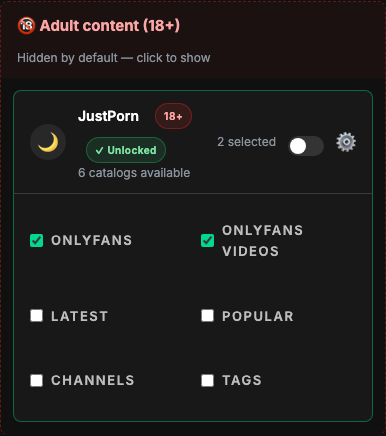
  2. Scroll to Catalogs, then open Adult content (18+).
  3. Open JustPorn and tick OnlyFans Videos.
  4. Select Save changes.

Enable OnlyFans Videos under Collections → Adult content → JustPorn

Saving the collection updates its catalog version while keeping the same personal link. Stremio should detect that new version automatically. If the new catalog or filters still do not appear, uninstall the collection addon from Stremio, then install it again using the same personal collection link.

release Jul 18, 2026

Anime now has five stream sources

Anime now gives you five selectable stream sources, so one unavailable server no longer has to stop an episode.

The available sources are:

  • AnimeX — the primary fast-starting HLS source
  • HiAnime — SUB and DUB streams with source-provided subtitles
  • AniZone — an additional HLS backup
  • Kaa.lt — multi-quality HLS with multiple audio tracks when available
  • nyaa.si — torrent releases, playable directly or through your configured debrid service

We also fixed playback compatibility for HiAnime and Kaa.lt. Their HLS media now passes through Roxxy's secure playback proxy, preventing the “video is not supported” error caused by upstream headers and disguised segment formats.

All stream rows now use a consistent source name and description, making language, quality, protocol, subtitles, file size, and seeders easier to scan.

You can enable or disable each source independently under Settings → Stream → Anime, then save your collection. Existing personal install links update automatically—there is no need to reinstall the addon.

news Jul 15, 2026

The Hub now works in Nuvio

Good news for Nuvio users — every Roxxy Hub install link now works in Nuvio too. Same catalogs, same streams, the same subscription — now in a second app alongside Stremio. We've tested the full flow end-to-end: catalogs, meta, and premium streams all play.

Nuvio adds addons a little differently from Stremio — there's no one-click button, you paste the link — so here's the whole flow:

  1. Copy your install link. On your collection's edit page hit the new Add to Nuvio button (it copies the link for you), or grab the preview link from the homepage.
  2. Open Nuvio → Settings → Add-ons → Add Addon.
  3. Paste the link into the Addon URL field and tap Install Addon.

That's it — your catalogs show up as their own rows, just like in Stremio.

Use your own personal collection link, not just the preview one. Your subscription rides inside the link, so the same link that unlocks premium streams in Stremio unlocks them in Nuvio — no extra sign-in. The anonymous preview link browses everything but keeps streams locked, same as always.

Full walkthrough with screenshots is on the install guide.